
Monday, December 20, 2010
Internet Treasure Hunts - A Treasure of an Activity for Students Learning English
Ian Brownijbrown [at] netspace.net.au
Australian Pacific College (Sydney, Australia)
Originallly presented at the
1999 ACTA-ATESOL National Conference - TESOL Matters for the Millennium
Sydney, Australia, 17-21 January 1999
Introduction
The most successful activity I have been using involving the Internet and the World Wide Web is Internet Treasure Hunts (or Scavenger Huntsas they are alternatively known).In an Internet Treasure Hunt students, working cooperatively in groups of two or three to a computer connected to the WWW, use Netscape to search for answers to a variety of questions by searching various Web sites and pages for the answers. There are a number of such activities already prepared, online and free to use from Web pages that include hyperlinks to the sites that need to be accessed to find the answers to the hunt. This means a search engine does not need to be used in these Treasure Hunts. Several of the Online Treasure Huntshave been specifically designed for ESL students and the Internet TESL Journal at http://iteslj.org/th/ maintains a useful link to a collection of these.
Other prepared Treasure Hunts can be found on the WWW. Some are for ESL students and others are designed for Primary or High school students but can often be used with ESL students as well. Alternatively, teachers can make up their own and even publish them on the web through their own homepage or through a site such as the Internet TESL Journal. A variation on the Treasure Hunt, which includes hyperlinks to the sites where the answers are found, is one without these links necessitating the use of search engines. Although this is easier for the teacher to prepare it is far more difficult for students to complete and I recommend them for use only with students who are of particularly high level and fully conversant with the use of the Internet. A further variation of the unlinked Treasure Hunt is the Web Quest which is a longer term project designed for native speakers that involves more complicated tasks, than just answering a few questions, and can take weeks to complete. This type of quest is less suitable for my teaching situation but could be very valuable for teachers in a different situation. ( http://edweb.sdsu.edu/webquest/webquest.html has more information on these.)
Background
The students I teach are mostly young adults from Asian and European countries aged in their twenties although sometimes there are a few older students in their thirties or forties. Their educational background is mixed with most having graduated from high school and many, but not all currently undertaking or having graduated from university or college in their home countries. Others have various types of work experience. Some students have never traveled outside of their home countries before and enter the college immediately on their arrival in Sydney so that it is their first experiences outside of their home countries. Most have graduated high school or college in their home country and some have varied work experience. Although, some students have been exposed to different styles of language learning at other private language institutions in Australia or their home countries, many are only familiar with the style of language teaching used in the high schools and colleges of their home countries which in many cases means a strong leaning to Grammar Translation methodology. Students are learning English in Australia for a variety of reasons including to continue on to further study in Australia, to enhance their job prospects in their home countries or to make friends with Australians and get more out of their stay in Australia. Class size at any time is around 10 to 15 students and includes a mix of male and female. At Intermediate level students will have been exposed to at least 900 hour of English and their level corresponds to an approximate rating on the ASLPR scale of between 2 and 3 for the four macros skills.Computer knowledge and skills of the students is mixed with some quite conversant with using Netscape and the Internet whilst others are just using it for the first time.
The World Wide Web
The WWW can be thought of as the largest library in the world, with Web sites the equivalents of books, full of information in English on almost any topic that can be imagined making it a vast storehouse of free and authentic materials for the ESL teacher to use. The Web pages contain not only text and pictures but also sounds, music, animation and movies and are linked together differently to the linear method of books and page numbers through the use of hyperlinks whereby clicking on a textual or graphic link transports you directly to a different page in a different book.Linda Mak on http://www.hku.hk/ssrc/newLearn.html lists some ways in which language learning on the Web is different from conventional classroom learning.
Traditional Language Learning       Web-based Language Learning
-----------------------------       ---------------------------
Linear presentation                 Hypertext, Multimedia
Not motivating                      High motivation
Receptive learning                  Self-paced, Self-access
High teacher control                High learner control
One-to-many (teacher to students)   Individual + many to many
Limited resources                   Unlimited, update information
Relevant to Internet Treasure Hunts she goes on to say
Let me take a few examples to show you how the WWW provides more choices and resources for language learners than conventional classrooms or self-access learning centres. Conventionally, when we read a passage or an essay in print form, the information is linear and there is only one route for readers to continue. Though you may choose to skim or skip any part, the passage is an end in itself. On the WWW, however, information is presented in hypertext and multi-routes are permitted. You may stop at any point to click on a highlighted phrase and jump to other support information, such as a glossary of difficult/ technical terms, the background of the author or society, the pronunciation of words, etc. What's more interesting is: there can be no end to the WWW document you are reading, as you may read a related document written by another author and follow links after link to browse around WWW documents in different parts of the world.Warschauer in his article in the Internet TESL Journal http://iteslj.org/Articles/Warschauer-Internet.html lists some guidelines for using the Internet for teaching English:
- Consider Carefully Your Goals
- Think Integration
- Don't Underestimate the Complexity
- Provide Necessary Support
- Involve Students in Decisions
Objectives & Outcomes
- The linguistic focus in this activity is on reading with the focus on students scanning through web pages and using hyperlinks to find the specific answers to their questions. Students will examine pictures, titles, headlines, menus and indexes for clues to find the answers. Students should use their knowledge to predict where the answer can be found and what links to follow whilst skipping through areas that are unlikely to have the answer.
- When using the program in a class lesson I have two or three students working together on a computer thus involving them in cooperative learning. This provides a range of communicative benefits not inherent in use of the program by a single student to the computer, which is better, suited for a self-access activity rather than a class one. Using the computer in cooperative learning facilitates a range of authentic communicative benefits as the students work together to find the answers to the questions, agreeing, disagreeing, offering opinions and helping each other.
- A further outcome of use of this activity is that it familiarises students with web browser use and navigation on the WWW through the use of hyperlinks. It acquaints them to the nature of the web and its format and gives them a sampling of the vast resources that are available. All this prepares students for more detailed research on the Web using search engines at a later time.
Advantages of CALL
The advantages of building on reading skills using the computer, Internet and hyperlinks are increasingly becoming evident in CALL. Moore in his article on reading on the Internet says (1998, p.326) "There is little doubt that the Internet can bring access to a much wider range of information and resources than are currently available in most classrooms." Vast amounts of information on any topic are accessible through the web and navigation with the use of hyperlinks is far faster and better suited to scanning than linear print media. All materials are real and authentic use of language that is generally very current and up to date. Students usually find using the Internet interesting and challenging and this generally increases their motivation to complete the task. Ganderton in his article on L2 reading on the World Wide Web mentions many of the issues involved with reading on the web (1998, pp. 2-3) including what he calls the 'crucial difference between the reading of printed text and hypertext' which is the "nonlinear nature of hypertext" in contrast to the sequential nature of printed text. 'This has profound implications for the interactive view of L2 reading and the processes and strategies associated with it.'Whilst the activity has no communicative content inherent in itself, by using cooperative learning and having two or three students working together on the one computer to complete it, communicative benefit can be gained when to solve the tasks not only must students scan through the material but they must communicate their ideas and thoughts together. Ben Shneideman, a keynote speaker at the WorldCALL conference at Melbourne University in July 1998 stressed that the use of co-operative learning with CALL is one of its strongest benefits. McKay and Robinson (1997 p. 17) echo this sentiment, as do many others. 'Computers can provide opportunities for cooperative learning. Students are able to pool their knowledge and enhance peer correction as they work together.' The cooperative efforts of students working together to complete the listening exercises gives the use of the program a range of communicative benefits, lacking within the exercises of the program itself, when they converse on what the answers should be. Sussex calls this the 'social dimension of CALL' (1998). Nunan (1993 pp. 82-83) talks about the importance of pair and group work in providing opportunities for learners to use and improve language in an individual manner as well as to increase motivation. As a further refinement I always insist on mixed nationality groups, as they must communicate in the common language of English to be able to proceed in the program. Coleman (1996, p. 24) has the same idea. 'All CALL lessons are undertaken with the students working in mixed nationality pairs'. This activity like others I use in the CALL lab is one which exemplifies the advantages of using CALL for cooperative learning.
Link to the Curriculum
Since in my teaching situation the curriculum is built around weekly themes, Internet Treasure Hunts can be quite easily linked to the curriculum by linking the theme of the hunt to the weekly theme of the class. For example hunts from the Internet TESL Journal site can be linked to such weekly themes as travel, interests, media and technology. For students intending to complete further study, using the Internet for research is increasingly becoming important, thus this activity which links improving language skills with learning Internet skills is especially relevant to them because it builds on their Internet skills and introduces them to researching on the Web.Set Up, Time, Resources & Equipment
Faster modem or cable connection is preferred for speed of connection as is a recent release version of a web browser loaded with current plug ins, to handle the many new features of web pages around nowadays. A handout of the questions is also recommended which can just be a printout from the web page.With my intermediate class I will need at least 90 minutes, more likely 120, for one Treasure Hunt but this time can vary according to the students' level of English and familiarity with use of the web browser.
Role of the Teacher
With students unfamiliar to the WWW and use of a web browser the teachers' role is made far more difficult as they must become an Internet teacher as well as an ESL one. The teacher must introduce the workings of the web browser and the concept of the Internet to those Internet novice students. During the activity the teacher is kept busy monitoring the students' progress and intervening to help when they cannot find an answer or start moving to the wrong links. The teacher has an essential role in lubricating smooth running of the program for the students by problem solving when they get stuck or lost. Technical problems with the Internet requiring restart of the program or even the computer can and do happen sometimes when using the Internet so the teacher must also be able to do a little technical problem solving as well. Especially when conducting this activity for the first time conducting this lesson can be very exhausting for the teacher.Procedure
At the beginning of my lesson I allocate the students to which partner or partners I want them to work with. Where possible I choose students to work with students of a different nationality in all CALL activities so that they cannot use their native language and cancel out the communicative benefits of cooperative learning. In this activity I match computer novices with those more experienced at using the WWW and where possible I also will mix weaker students with stronger students on the same computer.I begin by explaining what activity we are going to do and what benefits there are for the students in doing this. Explaining to the students what expected outcomes there are for them in using the computer, greatly enhances their interest and motivation in using the activity. This leads to more satisfaction on their part and should enhance the benefits of the activity as well. I include a quick review of the Internet, the WWW and Web browsing. Whilst the students gather around me and I demonstrate the controls and procedures for doing the activity. I discuss the meaning of treasure hunts, introduce the activity and explain the linguistic goals for doing the activity. I do this quite fully each time, even if most of the students have already done this before.
Next, I pass out a handout of the questions to each group on which they can write the answers. I circulate among the groups observing their progress and assisting where required when they get stuck or lost. Sometimes clarification is required as to why a certain path is required but in general when the correct answer is found the meanings become self evident. Students work at their own speed. At the intermediate level I usually devote 90 minutes to this activity. It is rare for any group to finish with much time to spare. Some groups will not be able to complete the full hunt in this time. It is usually not necessary to go through the answers at the end of the lesson because during my monitoring I have checked all the groups' answers as they are doing it. This is preferable so that the students can see where the answers have come from.
Assessment & Evaluation
I am able to assess students' progress through the activity as I am closely monitoring their progress throughout the activity. The speed and ease with which they are able to get through the activity is another measure of their progress. Student evaluation of use of this activity is available by having students fill in an evaluation questionnaire. Feedback on use of this activity from my students is generally very positive. Not only do they acknowledge the value for their reading skills but they also like improving their Internet skills and appreciate the communicative benefits of cooperative learning involved in this activity.Difficulties & Problems
Technical problems such as the slow speed of the Internet as seen in time delays for pages to load up can be a hindrance leading to wasted time whilst students just wait for the page to load. Web pages often change or disappear and this can happen overnight so it is quite possible for the links to a treasure hunt that worked a week ago to suddenly not work anymore and one needs to be prepared for this.Students' lack of Internet knowledge can be a serious impediment to the activity as well, which is why I match novices with those more experienced. If a class is made up a majority of novices it will be difficult to carry out the activity as time will be spent on learning to navigate and use the web browser rather than on the linguistic reading goals. In this case I advocate first carrying out some other lessons or activities to familiarise students with the web prior to attempting this activity. Another difficulty that can arise with students is that of student 'Luddites'. Some students will not accept the use of the Internet and computers as a method of language learning and will be disinterested or even antagonistic to this activity. Discussing the linguistic goals and advantages of this activity on the computer in detail at the beginning of the lesson, as suggested, is one way to win over some of these students.
English Teachers' Barriers to the Use of Computer-assisted Language Learning
Kuang-wu LeeJohnny [at] hcu.edu.tw
Hsuan Chuang University (Hsinchu, Taiwan)
Computers have been used for language teaching ever since the 1960's. This 40-year period can be divided into three main stages: behaviorist CALL, communicative CALL, and integrative CALL. Each stage corresponds to a certain level of technology and certain pedagogical theories. The reasons for using Computer-assisted Language Learning include: (a) experiential learning, (b) motivation, (c) enhance student achievement, (d) authentic materials for study, (e) greater interaction, (f) individualization, (g) independence from a single source of information, and (h) global understanding. The barriers inhibiting the practice of Computer-assisted Language Learning can be classified in the following common categories: (a) financial barriers, (b) availability of computer hardware and software, (c) technical and theoretical knowledge, and (d) acceptance of the technology.
Introduction
In the last few years the number of teachers using Computer-assisted Language Learning (CALL) has increased markedly and numerous articles have been written about the role of technology in education in the 21st century. Although the potential of the Internet for educational use has not been fully explored yet and the average school still makes limited use of computers, it is obvious that we have entered a new information age in which the links between technology and TEFL have already been established.In the early 90's education started being affected by the introduction of word processors in schools, colleges and universities. This mainly had to do with written assignments. The development of the Internet brought about a revolution in the teachers' perspective, as the teaching tools offered through the Internet were gradually becoming more reliable. Nowadays, the Internet is gaining immense popularity in foreign language teaching and more and more educators and learners are embracing it.
The History of CALL
Computers have been used for language teaching ever since the 1960's. According to Warschauer & Healey (1998), this 40-year period can be divided into three main stages: behaviorist CALL, communicative CALL, and integrative CALL. Each stage corresponds to a certain level of technology and certain pedagogical theories.Behaviorist CALL
In the 1960's and 1970's the first form of computer-assisted Language Learning featured repetitive language drills, the so-called drill-and-practice method. It was based on the behaviorist learning model and as such the computer was viewed as little more than a mechanical tutor that never grew tired. Behaviorist CALL was first designed and implemented in the era of the mainframe and the best-known tutorial system, PLATO, ran on its own special hardware. It was mainly used for extensive drills, explicit grammar instruction, and translation tests (Ahmad, et al., 1985).Communicative CALL
Communicative CALL emerged in the 1970's and 1980's as a reaction to the behaviorist approach to language learning. Proponents of communicative CALL rejected behaviorist approaches at both the theoretical and pedagogical level. They stressed that CALL should focus more on using forms rather than on the forms themselves. Grammar should be taught implicitly and students should be encouraged to generate original utterances instead of manipulating prefabricated forms (Jones & Fortescue, 1987; Philips, 1987). This form of computer-based instruction corresponded to cognitive theories which recognized that learning was a creative process of discovery, expression, and development. The mainframe was replaced by personal computers that allowed greater possibilities for individual work. Popular CALL software in this era included text reconstruction programmers and simulations.Integrative CALL
The last stage of computer-assisted Language Learning is integrative CALL. Communicative CALL was criticized for using the computer in an ad hoc and disconnected fashion and using the computer made 'a greater contribution to marginal rather than central elements' of language learning (Kenning & Kenning, 1990: 90). Teachers have moved away from a cognitive view of communicative language teaching to a socio-cognitive view that emphasizes real language use in a meaningful, authentic context. Integrative CALL seeks both to integrate the various skills of language learning (listening, speaking, writing, and reading) and to integrate technology more fully into language teaching (Warschauer & Healey, 1998). To this end the multimedia-networked computer provides a range of informational, communicative, and publishing tools that are potentially available to every student.Why Use CALL?
Research and practice suggest that, appropriately implemented, network-based technology can contribute significantly to:- Experiential Learning
- The World Wide Web makes it possible for students to tackle a huge amount of human experience. In such a way, they can learn by doing things themselves. They become the creators not just the receivers of knowledge. As the way information is presented is not linear, users develop thinking skills and choose what to explore.
- Motivation
- Computers are most popular among students either because they are associated with fun and games or because they are considered to be fashionable. Student motivation is therefore increased, especially whenever a variety of activities are offered, which make them feel more independent.
- Enhanced Student Achievement
- Network-based instruction can help pupils strengthen their linguistic skills by positively affecting their learning attitude and by helping them build self-instruction strategies and promote their self-confidence.
- Authentic Materials for Study
- All students can use various resources of authentic reading materials either at school or from their home. Those materials can be accessed 24 hours a day at a relatively low cost.
- Greater Interaction
- Random access to Web pages breaks the linear flow of instruction. By sending E-mail and joining newsgroups, EFL students can communicate with people they have never met. They can also interact with their own classmates. Furthermore, some Internet activities give students positive and negative feedback by automatically correcting their on-line exercises.
- Individualization
- Shy or inhibited students can be greatly benefited by individualized, student-centered collaborative learning. High fliers can also realize their full potential without preventing their peers from working at their own pace.
- Independence from a Single Source of Information
- Although students can still use their books, they are given the chance to escape from canned knowledge and discover thousands of information sources. As a result, their education fulfils the need for interdisciplinary learning in a multicultural world.
- Global Understanding
- A foreign language is studied in a cultural context. In a world where the use of the Internet becomes more and more widespread, an English Language teacher's duty is to facilitate students' access to the web and make them feel citizens of a global classroom, practicing communication on a global level.
What Can We Do With CALL?
There is a wide range of on-line applications which are already available for use in the foreign language class. These include dictionaries and encyclopedias, links for teachers, chat-rooms, pronunciation tutors, grammar and vocabulary quizzes, games and puzzles, literary extracts. The World Wide Web (WWW) is a virtual library of information that can be accessed by any user around the clock. If someone wants to read or listen to the news, for example, there are a number of sources offering the latest news either printed or recorded. The most important newspapers and magazines in the world are available on-line and the same is the case with radio and TV channels.Another example is communicating with electronic pen friends, something that most students would enjoy. Teachers should explain how it all works and help students find their keypals. Two EFL classes from different countries can arrange to send E-mail regularly to one another. This can be done quite easily thanks to the web sites providing lists of students looking for communication. It is also possible for two or more students to join a chat-room and talk on-line through E-mail. .
Another network-based EFL activity could be project writing. By working for a project a pupil can construct knowledge rather that only receive it. Students can work on their own, in groups of two or in larger teams, in order to write an assignment, the size of which may vary according to the objectives set by the instructor. A variety of sources can be used besides the Internet such as school libraries, encyclopedias, reference books etc. The Internet itself can provide a lot of food for thought. The final outcome of their research can be typed using a word processor. A word processor can be used in writing compositions, in preparing a class newsletter or in producing a school home page. In such a Web page students can publish their project work so that it can reach a wider audience. That makes them feel more responsible for the final product and consequently makes them work more laboriously.
The Internet and the rise of computer-mediated communication in particular have reshaped the uses of computers for language learning. The recent shift to global information-based economies means that students will need to learn how to deal with large amounts of information and have to be able to communicate across languages and cultures. At the same time, the role of the teacher has changed as well. Teachers are not the only source of information any more, but act as facilitators so that students can actively interpret and organize the information they are given, fitting it into prior knowledge (Dole, et al., 1991). Students have become active participants in learning and are encouraged to be explorers and creators of language rather than passive recipients of it (Brown, 1991). Integrative CALL stresses these issues and additionally lets learners of a language communicate inexpensively with other learners or native speakers. As such, it combines information processing, communication, use of authentic language, and learner autonomy, all of which are of major importance in current language learning theories.
Teachers' Barriers to the Use of Computer-assisted Language Learning
The barriers inhibiting the practice of Computer-assisted Language Learning can be classified in the following common categories (a) financial barriers, (b) availability of computer hardware and software, (c) technical and theoretical knowledge, and (d) acceptance of the technology.Financial Barriers
Financial barriers are mentioned most frequently in the literature by language education practitioners. They include the cost of hardware, software, maintenance (particular of the most advanced equipment), and extend to some staff development. Froke (1994b) said, "concerning the money, the challenge was unique because of the nature of the technology." Existing universities policies and procedures for budgeting and accounting were well advanced for classroom instruction. The costs of media were accounted for in the university as a part of the cost of instruction. Though the initial investment in hardware is high, inhibiting institutions' introduction of advance technologies; but Hooper (1995) recommends that the cost of computers will be so low that they will be available in most schools and homes in the future.Lewis et al. (1994) indicate three conditions under which Computer-assisted Learning and other technologies can be cost-effectiveness: Computer-assisted Learning costs the same as conventional instruction but ends up with producing higher achievement in the same amount of instructional time, it results in students achieving the same level but in less time. These authors indicate that in examples where costs of using technologies in education are calculated, they are usually understand because the value of factors, such as faculty time and cost of equipment utilization, is ignored (McClelland, 1996).
Herschbach (1994) argues firmly that new technologies are add-on expenses and will not, in many cases, lower the cost of providing educational services. He stated that that the new technologies probably will not replace the teachers, but will supplement their efforts, as has been the pattern with other technologies. The technologies will not decrease educational costs or increase teacher productivity as currently used. Low usage causes the cost barrier. Computers, interactive instruction TV, and other devices are used very few hours of the day, week, or month. Either the number of learners or the amount of time learners apply the technology must be increased substantially to approach the concept of cost-effectiveness. There are other more quick and less expensive ways of reducing costs, no matter how inexpensive the technology being used (Kincaid, McEachron, & McKinney,1994.
Availability of Computer Hardware and Software
The most significant aspects of computer are hardware and software. Availability of high quality software is the most pressing challenge in applying the new technologies in education (Herschbach, 1994; Miller, 1997; Office of Technology Assessment, 1995; Noreburg & Lundblad, 1997). Underlying this problem is a lack of knowledge of what elements in software will promote different kinds of learning. There are few educators skilled in designing it because software development is costly and time-consuming (McClelland, 1996).McClelland (1996) indicated having sufficient hardware in locations where learners have access to it problematic and is, of course, partly a financial problem. Computer hardware and software compatibility goes on to be a significant problem. Choosing hardware is difficult because of the many choices of systems to be used in delivering education, the delivery of equipment, and the rapid changes in technology.
Technical and Theoretical Knowledge
A lack of technical and theoretical knowledge is another barrier to the use of Computer-assisted Language Learning technology. Not only is there a shortage of knowledge about developing software to promote learning, as shown above, but many instructors do not understand how to use the new technologies. Furthermore, little is known about integrating these new means of learning into an overall plan. In the communication between McClelland and C. Dede (1995), Dede indicated the more powerful technologies, such as artificial intelligence in computers, might promote learning of higher-order cognitive skills that are difficult to access with today's evaluation procedures and, therefore, the resulting pedagogical gains may be under-valued. Improper use of technologies can affect both the teacher and learner negatively (Office of Technical Assessment, 1995).Acceptance of Technologies
We live in a time change. Gelatt (1995) stated that change itself has changed. Change has become so rapid, so turbulent, and so unpredictable that is now called "white water" change (p.10). Murphy & Terry (1998a) indicated the current of change move so quickly that they destroy what was considered the norm in the past, and by doing so, create new opportunities. But, there is a natural tendency for organizations to resist change. Wrong conceptions about the use of technology limit innovation and threaten teachers' job and security (Zuber-Skerritt, 1994). Instructors are tend not to use technologies that require substantially more preparation time, and it is tough to provide instructors and learners access to technologies that are easy to use (Herschbach, 1994).Engaging in Computer-assisted Language Learning is a continuing challenge that requires time and commitment. As we approach the 21st century, we realize that technology as such is not the answer to all our problems. What really matters is how we use technology. Computers can/will never substitute teachers but they offer new opportunities for better language practice. They may actually make the process of language learning significantly richer and play a key role in the reform of a country's educational system. The next generation of students will feel a lot more confident with information technology than we do. As a result, they will also be able to use the Internet to communicate more effectively, practice language skills more thoroughly and solve language learning problems more easily.
Online Strategic Interaction:
ESL Role-Playing via Internet Relay Chat
Christopher M. Colburndude [at] bert.eds.udel.edu
http://bert.eds.udel.edu/~dude/
Department of Linguistics, University of Delaware
Introduction
As the age of computer-assisted and adaptive language learning become real concerns of the modern language teacher, it has become necessary to investigate the ways in which the computer can enhance existing teaching methods to improve the overall quality of language instruction. Many researchers have attempted to add their own electronic components to their favorite exercises.Strategic Interaction (SI) (Di Pietro 1987) was no exception to the electronic bandwagon. In the 1980s, Di Pietro and Arena proposed a number of writing exercises based on his paradigm (cf. Arena and Di Pietro, press pending.) The original concept involved the practice of writing using terminals connected via a PLATO mainframe (Dyer 1983.) With the demise of mainframe technology, Arena sought a modern solution for implementing these exercises.
The emergence of the Internet in the mid 1990s provided a viable way to participate in these exercises in both classroom and distance-learning situations. This paper describes the how, where, and why of implementing Strategic Interaction over local-area and wide-area networks. This description includes not only the goals and merits of the SI writing exercises, but also provides the technical background for those who want to make the exercises work in a local or global electronic classroom environment.
Background
Strategic Interaction: An Overview
Strategic Interaction (SI) refers to a teaching method that was devised by Robert Di Pietro at the University of Delaware (cf. Di Pietro 1987.) SI involves the use of interactive scenarios to foster better communicative competence in the target language. This overview will cover the issues of student roles in the exercise, the types of scenarios that are used, and the three stages that take place in SI exercises.The SI exercises take place in three stages, or phases. The first stage is known as the Planning stage. During the planning stage, the instructor or moderator splits the class into two or more groups. Each of these groups is given a different role to play within a given scenario. The students are than given some time in which to plan their given role in the scenario. Scenarios usually come from one of four types (Di Pietro 1987: 48-58):
- The basic scenario is the Two-Role type, which is suitable for one encounter. In a group situation, there are two groups, and each group has a spokesperson who interacts on behalf of the whole.
- Multiple-Role scenarios have more than two direct roles. Di Pietro notes that this type of scenario is only useful for all parties if each role has a distinct reason for being involved. "Background-only" characters are not a good idea, as they do not promote direct interaction among the multiple roles. One idea hinted at by Arena and supported by this author involves using the teacher/moderator as a background character. This can be advantageous for moving the scenario along, especially with less-advanced groups. This character can provide assistance or inject additional tension into the scenario as warranted by the students' performance.
- In Group scenarios, all students react in their own ways to an event or situation that involves or affects everyone in the group. This lends itself to use on the Internet, since everyone can make their thoughts known to everyone else (over the IRC network) without anyone's contribution getting lost in the conversation. This is especially important for the more traditionally quiet speakers in the class, who are placed on a more equal footing when presented with the Internet-based classroom.
- Open-Ended scenarios promote the development of long-term roles and interrelated episodes that may span a number of class sessions. Di Pietro notes that these scenarios are good for showing the relationships among different events that take place in a target culture.
In these exercises, the roles given to the students are different from those in a drama exercise. First, the scope of the role is only limited by the students' abilities. The role is dynamic, and never plays out the same way twice. Also, the roles given to each group are unknown to the members of the other group(s) until the Performance stage of the exercise. This is important to the theme of the exercise, because the roles given to each group are slightly different in focus and/or goals. These differences produce a "twist," or point of conflict, that appears in the Performance stage.
Once the students have prepared their roles, a spokesperson is appointed, and the second, or Performance stage begins. If the scenarios are well-constructed, the "twist" in the scenario appears quickly. As students' expectations of what they were going to say quickly disappear, the students must attempt to maintain communication in the target language while trying to make their case and/or resolve the conflict that has arisen. The goal of the exercises is for the students to work creatively in the target language to resolve the conflict successfully. The end result is that no scenario has the same ending: the outcome depends on the students' abilities to resume and/or maintain communication in the face of a breakdown. By forcing the students to deal with a conflict for which they are not prepared, students are encouraged to think "on their feet" in a manner that they will need to survive in an L2 environment. If the spokesperson needs any help with issues of communication, he or she is free to return to the group, who can then make suggestions that the spokesperson can use in the scenario. The Performance stage continues until the instructor or moderator observes a successful resolution to the scenario, until communication breaks down, or until time constraints force an end to the performance.
The third stage of the exercise is known as the Debriefing stage. At this point in the exercise, the instructor or moderator regroups the class, and discusses the events of the Performance stage. There may be a discussion of discourse, cultural, or grammar problems that appeared. During this stage, the teacher can also provide feedback on how to improve communication and/or performance at key points in the scenario, so the students will be better prepared to perform in future scenarios.
SI's Relationship with Second Language Acquisition and CALL
Part of the original rationale for using CALL in the United States was to provide supplemental exposure to the target language in environments where contact with native speakers and/or instructors was limited, either due to geography or large class sizes. It was hoped that an increase in comprehensible input (cf. Krashen, 1982 and Krashen, 1985) would allow students to progress more quickly.From the perspective of writing, Ellis (1987) looked at how writing proficiency, like other forms of linguistic competence in a second language, progressed over what he called the interlanguage continuum. When a student first begins to acquire a new language, the student applies what he or she already knows about language to the new one. In effect, his or her writing may use the lexical items of the target language, but uses the structures and idioms of the native (or other second) languages (cf. Colburn 1992.) As the student acquires more of the target language, these L1 structures tend to disappear as the student begins to produce structures that more closely approximate the target language.
These topics relate to Strategic Interaction in that one of the goals of the method is to force the student to use the structures of the target language in a pressure situation. The dialogue provides spontaneous input in manageable chunks. It also allows the student to work with the target language in a group situation that can foster improvement for all of the group members, whether or not they are actors in the scenarios.
Recent Trends in CALL: Transitioning to the Internet
A number of researchers have undertaken work on Computer Assisted Language Learning (CALL) and Computer Adaptive Teaching (CAT) as computers have become more widespread in both homes and schools. Since the early 1980s, researchers have come up with a myriad of exercises to improve communicative competence in foreign language classes. Kenning and Kenning have noted that computer-based interactions "and normal language do not seem to go together very well" (Kenning and Kenning 1990: 63.) Most of the research that they did, however, dealt with the interaction between a computerized "tutor" and a single student. Ahmad and his colleagues mention the importance of CALL in developing writing skills (Ahmad et al. 1985:105,) but make no reference to interactive writing skills between groups of students.To some extent, we find that literature on CALL in the 1980s makes few references to student interaction over networks, simply because of its impracticality at that time. This was a result of the facts that wide-area networking was far too slow at that time to facilitate interactive written conversations in a reasonable amount of time, and because long-distance communication of this type was severely limited, since the Internet as we now know it did not exist on a widespread scale (and ran at much slower speeds as well.)
One point in the literature, however, shows that CALL, even in the Strategic Interaction context, was being used on local-area networks in the early 1980s. In her dissertation, Pat Dyer recounts the use of the PLATO (Programmed Logic for Automated Teaching Operations) system to implement a number of SI exercises at all levels of instruction at the University of Delaware's English Language Institute (ELI.) The system was used with some success as a component of the Institute's intensive program of English instruction (cf. Dyer 1983: 65-85.)
One of the advantages of the PLATO system was its ability to handle lessons and instructions that were pre-programmed for use on the local network by the students. From a standpoint of current technology, however, this system is not as practical as it once was. The networking and use of the mainframe was confined to a limited area. With the advent of the desktop PC, it became necessary to provide a package that could be used not only while connected to a mainframe, but while connected to a larger network, such as a campus-wide LAN or the Internet. This would allow the students to work in larger groups, and over greater distances, and on a number of operating systems. This need led to the development of the Internet-based SI exercises.
SI on the Intra/Internet: Technical Aspects
When Lou Arena the author with instructions to adapt SI for modern machines, he was presented with limited resources: two Apple PowerBooks and no Internet access. From these beginnings, SI exercises were adapted for LAN use. Based on this original conception, the idea was then expanded for use on the global Internet, as well as for use on multiple platforms. The original conception, as well as the expanded version, are explained below. Note: this section may be more appropriate for the IT managers in the audience, but will also be helpful to the teacher who has to implement this on his or her own.SI Exercises on a MacOS-based LAN
For the original concept, the lack of Internet access forced the use of AppleTalk networking to connect the two computers. For simplicity's sake, the two computers were linked through the use of an RJ-11 cable attached to two LocalTalk adaptors, which were plugged into the serial port of each machine. Because of the speed limitations experienced on a LocalTalk network, experience has shown that an Ethernet-based AppleTalk network is more effective, and should be used if available. Once AppleTalk networking was enabled on both machines, the only remaining tasks involved supplying the scenarios, as well as the medium of written conversation.Each computer was supplied with text versions of their respective scenarios. Generic text files were supplied so that any text editor could open the files for viewing. Since all MacOS-compatible machines come with a copy of the SimpleText text editor, it is then easy to open the files when instructed. Note: if the machines in use are running a Language-Kit enabled version of the MacOS (such as the Chinese Language Kit or the Japanese Language Kit,) it is MOST important that the teacher supply an English-language version of SimpleText (or their favorite text editor) for use in the exercises. The versions of SimpleText supplied with these kits are enabled for reading two-byte languages, and they will interpret raw English ASCII text as gibberish.
To provide the conversation environment, the author discovered the ChatNet shareware program, from ELS, Inc. This program can be used freely on an AppleTalk network to link up to three machines in a chat environment, similar to that found on IRC (Internet Relay Chat,) or in a chat room on America Online. A copy of ChatNet is installed on each of the client machines. Each machine is configured as a different user (i.e. one username for each group taking place in the scenario.)
Multi-platform SI Exercises:
Internet-based IRC with WWW Support
The specifics of using these exercises over the Internet are less specific, because there are a number of ways to implement the necessary materials. Some guidelines, however, are presented for teachers who want to use these exercises in a multi-platform or distance-learning environment.The first concern is that the students' machines are connected to the Internet, either via modem or direct connection. With Internet connections, the physical locations of the students are irrelevant. The only difference involves how the conversational groups collaborate. If the group is in one classroom, they can collaborate verbally. If they are not in the same room, then they can collaborate and prepare their initial roles via a separate chat channel.
Next, the scenarios are presented to each group via a WWW browser. In this way, each student can retrieve the scenario for his/her group from a central location, thus obviating the need for each student to download specialized software for the exercises. Each group is given a different URL from which to retrieve the scenario.
Most importantly, the students need software on which to participate in the chat environment. Internet Relay Chat (IRC) clients are varied in features and performance, depending on the platform. Examples of clients that are usable for this exercise are listed here as guidelines, and not necessarily as requirements or endorsements. Any program with similar functionality can be used. For Windows, programs such as mIRC should suffice. For the MacOS, the author has used IRCle and ChatNet (although the latter needs to be registered to be used for more than ten minutes per session.) For Unix and appropriate clones, ircII, BitchX, cIRCus, and zIRCon have worked well, although ircII and BitchX may require multiple terminal sessions for best results. Any of these software packages are available from the popular Internet software archives for each respective computing platform.
Scenarios in Action
The following provides guidelines for using SI exercises in an online environment. Procedures that have been used on an AppleTalk LAN are provided. In addition, general guidelines for using the exercises on the Internet are also presented.With the LAN solution, only two computers are required (one for each group.) The teacher then instructs the students to choose one of the scenario files by opening it in the English version of SimpleText. The students view the situation file, and prepare their roles in another file in the text editor. When they are ready, the group can log onto the network to begin the Performance stage of the exercise.
Over the Internet, the students receive their instructions via a central web page. There they are instructed to access the appropriate scenario pages, and to log onto the appropriate chat channels via their preferred IRC client. The group prepares its role over one channel (which could be called the Planning channel.) When they feel sufficiently prepared, they appoint a "spokeswriter," and all students log onto a common channel (the Performance channel) to watch the spokespeople perform their scenarios.
Then, the students act out their roles by typing their lines into the computer. When conflicts arise, the students are forced to deviate from their pre-planned roles in order to come to a resolution. At times, this involves a number of strategies that are only used in a "communication breakdown" situation. In this way, the outcome of a scenario is different for each participating group, due to the lack of preparation inherent in creating the "twist."
If the spokeswriters cannot continue the interaction on their own, they are allowed to collaborate with their respective groups in order to get help. Over a LAN, the group helps the spokeswriter verbally, while over the Internet, the groups can provide written feedback to the spokeswriter over the Planning channel. In this way, the scenario is solved through a group effort, and all of the students get to practice their communication skills.
When the scenario is finished, the Debriefing phase can take place in one of two ways. On a LAN, the students can regroup in a classroom for a traditional debriefing. For a local class, this is advantageous, but for an Internet-based class, this is not feasible. After the Performance stage, the students can migrate to a Debriefing channel for the final stage of the exercise. On this channel, the moderator or instructor can conduct an online chat session that provides feedback for student performance during the scenario.
Advantages of the Exercise
Communicative competence is promoted through the Strategic Interaction exercises. Scenarios promote the kind of "on-your-feet" strategic thinking and communication skills usually associated only with acquisition-based environments. Specifically, these exercises develop a number of skills and perspectives not offered by other types of writing tasks. The major benefits to student writing occur in four main (interrelated) areas:
- Linguistic Competence: grammar and writing skills are developed and practiced on a more autonomic level, since it is harder to focus consciously on form when trying to think quickly;
- Sociolinguistic Competence: Role playing develops discourse skills and strategies not usually practiced in a written environment;
- Strategic Competence: network-based scenarios present a new way of trying to restore communication when it breaks down: strategies for restoring communication, and the duration of their effectiveness, become apparent for the respective scenarios;
- Discourse Competence: Scenarios enable students to practice cohesive devices in writing in a fast-paced environment: students learn the limitations and applications of transitions to prolong the communicative exchange.
The Design and Utilisation of an Internet Resource for Business English Learners
Michael Vallance
Abstract
The article details the design of a hypertext decision making activity located on the Internet for business English students wishing to review exponents and vocabulary associated with conducting business meetings (http://www.stir.ac.uk/epd/higdox/Vallance/Diss/FP1.htm). Statistical data from students who contacted the activity worldwide is discussed and recommendations offered for future development of Internet resources for language learners.
Introduction
Interest in Computer Aided Instruction (CAI) and Computer Aided Language Learning (CALL) is currently undergoing a resurgence as we approach the new millennium and access to computers by individuals and institutions increases worldwide. Over the past 12 years studies by Stevens (1984), Windeatt (1986), Pennington (1989), Taira (1993), Cheung & Harrison (1994), Mohan (1994), Evans (1996), and Lasarenko (1996) have attempted to analyse the improvements made by learners utilising computers and CALL software. However, Windeatt concluded from his evidence that "the students were not more motivated by having an activity presented in one medium (computer format) rather than the other (paper format)" (Windeatt:86;86). Eight years later Mohan similarly concluded from experimental data that "the computer role as a stimulus for speaking may not be an entirely appropriate one" (Mohan: 94;124). Furthermore, teachers and students often demonstrate unrealistic expectations of CALL, sometimes leading to complete aversion (Chen, 1996), or express criticism that teaching 'with' computers means teaching 'about' computers and not teaching English (Lasarenko, 1996). It was therefore decided to examine the effect of a completely new medium for EFL learners by developing a unique Internet Aided Language Learning (INTALL) resource entitled 'Business Meetings' targeting business English learners.The development of 'Business Meetings'
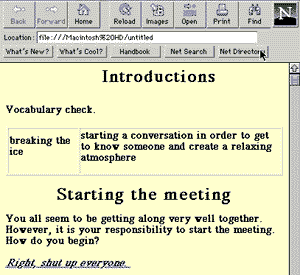
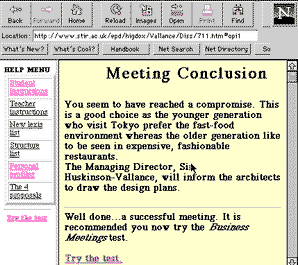
Deciding upon the scenario of a company meeting to discuss the decor of a new hotel in Tokyo, the first stage of writing 'Business Meetings' consisted of creating a flow diagram of the decision maze format utilised as exemplified by Mario Rinvolucri's 'Mazes' (1981), Joni Farthing's 'Business Mazes' (1981), and LONDON ADVENTURE (Hamilton,1986). At the beginning of the maze a situation was described and a number of options offered. The user had to select one of the given options where the corresponding action would take him/her to a response. The consequence of this action may take the form of a further situation, a problem or some advice. Subsequent actions were offered and the maze progressed until a final outcome was reached (see figure 3 below). Correct and incorrect options were explained at each linking page providing the user with information regarding form or appropriateness of the choice made. A sound file was available for users if they wished to listen to a native speaker model of the selected phrase, together with a picture on most pages to contextualise and demonstrate the carefully chosen exponents in action. A 'Help' menu allowed the user to leap out of the activity and return to the Instructions page at any time. However, users could not skip stages and jump to the end of the activity as a number of various outcomes were available, each one dependant upon the decision route taken by the user. At the end of the activity learners were encouraged to undertake the multiple-choice 'Business Meetings' test and complete a questionnaire.The most common (and easiest) program language for designing Internet pages is HTML (Hypertext Markup Language) detailed in HTML for Dummies (Tittle & James, 1995) or on-line in HTML Editor (Giles, 1996): figure 1 exemplifies the HTML commands for the 'Business Meetings' Introductions page and figure 2 illustrates the corresponding page as viewed by the student on the Internet.
Figure 1. 'Introductions' source code page.
Business Meetings
Introductions
Vocabulary check.
breaking the ice
starting a conversation in order to get to know someone and create a relaxing atmosphere
Starting the meeting
You all seem to be getting along very well together. However, it is your responsibility to start the meeting.
How do you begin?
Figure 2. 'Introductions' page as viewed via Netscape 1.1N
In all, 110 pages were written providing learners with the opportunity to review exponents and lexis associated with starting meetings, presenting opinions, accepting and rejecting proposals, presenting alternatives, building up arguments, and concluding the meeting. The learner was also encouraged to undertake a test which was checked and results directly returned to their e-mail directory.
Figure 3. An example 'Business Meetings' outcome.
Observation
From a multiple-choice questionnaire survey of students connected to 'Business Meetings' worldwide an overwhelming 93% thought the activity was a useful resource and worthwhile activity. Learners expressed they felt that the Internet activity was a 'comfortable method to learn some particular expressions in business English', 'imaginative', and 'would like to see more in the future.' On the other hand a number of learners suggested there was too much information on each linked page with some users unsure of the technical operation of the Internet such as downloading sound files and the use of scrolling pages. Some users wanted the option of returning to a previous page; a facility I deliberately did not include as I wanted learners to consider their actions prior to moving forward on the assumption that, although a simulation, once someone has regrettably said something or undertaken an action in real life the circumstance needs to be redressed. The odd humorous moment (for example, an employee angrily walking out of the room) was welcomed and users suggested that more of these unexpected actions would have made them more cautious when making decisions. Furthermore, students commented that they remembered a new lexical item due to the aforementioned employee's reaction. This suggests that problem solving activities with a particular focus on contextual clues and unpredictable outcomes may provide an opportunity for language acquisition for some learners. Teachers were also pleased that the inappropriate options were not met with a 'wrong-try again' response, but were given possible reasons for inappropriacy and the opportunity to rectify the situation or correct themselves at a later, similar situation. As observed by Evans (1996) and confirmed here, students not only used the Internet activity on their own (74%) but prefered doing so (75%). In the introduction to 'Business Meetings' I recommended users find a partner for negotiating and making decisions. This was encouraged both by the overseas contact teachers and locally when I supervised users. However, students appeared to self-initiate individual use of a computer terminal, sometimes ignoring partners. It was also observed that the more computer and linguistic confident students tended to dominate the terminals, with the less confident learners passively observing and gradually becoming bored. Furthermore, informal observations of local users indicated that students tended to read out loud the function phrases offered thereby neglecting the prosodic features of connected speech, even though models were provided for students to download (ie/ selecting the corresponding sound icon on the page). It is also ironic that using the Internet in its current format seems to reinforce the reading skill at a time when it was imagined that an oral culture based on television and telephones would reduce the role of the written word. An overwhelming 95% of students said they would like to see further similar activities available on the Internet. The response from EFL professionals was similarly in favour. Comments from remote users indicated they linked to 'Business Meetings' on more than one occasion: some users wanted to follow the scenario through to a conclusion; some wanted to observe the results of selecting incorrect responses; others wished to follow the scenario a second time prior to undertaking the test. Although it may be prudent to be cautious about data which relies on learner evaluations of CALL applications, as pointed out by Higgins (1995) and Brett (1996), the overwhelming impression from the data is that learners enjoyed using the Internet activity, were generally motivated and would certainly like to see further decision making activities on the Internet.Conclusion
A negative feature of a hypertext activity is the potential for passive viewing, with the learner failing to engage with the materials in ways which result in effective learning. However, if learners understand what is required of them, and actively think about the materials, their structure and relationship to learning, the opportunity for communication and linguistic development may be enhanced by decision making, hypertext activities available on the Internet. Such exercises which focus on contextual clues incorporating problem solving and decision making that are expected to produce sustained communication through corresponding negotiation requires planned pre-activity preparation and guidance. 'Business Meetings' was designed accordingly and questionnaire feedback suggested that the activity motivated learners, providing them with a valuable resource that can be refered to at any time either as a group activity or for individual self study. Furthermore, personalised learning programs may be authored by teachers with the provision to negotiate individual learning activities. What Brett has to say about multimedia programs is also relevant to the Internet:"Teachers may then be able to negotiate and to provide personalised learning programs consisting of individualised sequences of learning tasks as suggested by a true 'process' syllabus. Learners could use computers loaded with vast repositories of learning material and tasks to work on at their own pace, towards their own desired objectives, using preferred types of material and exploiting their own preferred learning strategies." (Brett:96;209)
Finally, investment in staff and student training is recommended for institutions to make substantial utilisation of the Internet and its associated technological and pedagogical benefits.
The Internet and Foreign Language Education: Benefits and Challenges
Meena Singhalhttp://www.gse.uci.edu/ed168/resume.html
The University of Arizona, USA
Introduction
Over the past few years, the Internet has emerged as a prominent new technology. The influence of such a powerful technological tool has pervaded all aspects of the educational, business, and economic sectors of our world. Regardless of one's familiarity with the Internet, it is repeatedly made reference to. News broadcasters and commercials, for example, will now provide web addresses, and even the recent movie, "The Net" was sparked by the impact of this new technology (Mike, 1996). Regardless of whether one uses the Internet or not, one must be clear about the fact that the we have entered a new information age and the Internet is here to stay.Because the use of the Internet is widespread in numerous fields and domains, without a doubt, it also carries great potential for educational use, specifically second and foreign language education. This paper will therefore focus on the following questions: 1) What is the Internet? 2) How can various facets of the Internet be used in the second and foreign language classroom? 3) What are the benefits of employing the Internet in such a setting? 4) What are the disadvantages or obstacles the Internet presents in a second language classroom? Lastly, the implications of using the Internet in second language classrooms will be discussed. The Internet is the latest in a series of technological innovations for second language education. In order to understand the role of the Internet, it would be useful to provide a brief history of technology and language teaching, present a survey of the technological resources available to second language learners, and, finally consider the role of the Internet and its possibilities.
Technology and Foreign Language Education: A Brief History
Technology and foreign language education are no stranger to one another. In the sixties and seventies, language laboratories were being installed in numerous educational settings. The traditional language laboratory was comprised of a series of booths, each providing a cassette deck, and accompanying microphone and headphone. Teachers monitored their students' interactions by using a central control panel. The basic premise behind this technology was that if verbal behavior was modeled, and then reinforced, students would quickly learn the language in question. The language lab activities were therefore grounded in a stimulus-response behavior pattern. The more drill practice the students encountered, the faster they would learn the second language. While the language laboratory was a positive step in linking technology and language education, it was soon recognized that such activities were both tedious and boring for learners. Furthermore, the amount of student-teacher interaction was minimal, and individualized instruction was irrelevant. Besides the pedagogical deficiencies, the audio equipment was cumbersome and prone to breakdown, and had only one function-to disseminate auditory input. These factors put together led to a shift to the communicative approach to second language education, namely, computer assisted language learning.Microcomputers and quality CALL software provided yet another medium for language learning. Its potential as both a teaching and learning tool are widely written about in the educational literature. At present, there are a variety of computer applications available including vocabulary, grammar, and pronunciation tutors, spell checkers, electronic workbooks, writing and reading programs, as well as various authoring packages to allow instructors to create their own exercises to supplement existing language courses. In addition to the range of software available, CALL has also been shown to increase learner motivation (Blake, 1987). Chun and Brandl (1992) also propose that the interactive and multimedia capabilities of the computer make it an attractive teaching/learning tool. Computers can provide immediate feedback to students and students can work at an individualized pace. Software can be designed to include sound, graphics, video, and animation. Moreover, information is presented in a non-linear sequence enabling learners to select the exercises or concepts they wish to review.
Despite the advantages and widespread use of CALL, it continues to suffer from criticisms for several reasons. Many believe that learning and practicing grammar rules of a foreign language through fill-in-the-blank exercises, for example, does little to improve a speaker's ability to produce grammatically appropriate utterances (Armstrong & Yetter-Vassot, 1994). Others point out that CALL suffers from its rigidity in light of the complexities of natural languages. For example, a program designed to provide drill practice on French verb conjugation is useful for only that and nothing else. Recently, however, we are beginning to see encouraging and promising results in the area of CALL software development. Interactive video and programs which provide more authentic and communicative task-based activities are being created, which are more in line with the current theoretical and pedagogical views of learning.
What is the Internet?
While the computer is now used in some form or another in most language classrooms, and is considered standard equipment, the Internet is also gradually being introduced in the second language classroom as teachers become more familiar with it. The Internet is a confederation of thousands of computers from various sectors of society such as education, business, government and the military. It is a network of thousands of computer networks (Lewis, 1994). Each individual system brings something different to the whole (databases, library services, graphs, maps, electronic journals, etc), and the end result is a vast accumulation of information. It is a worldwide network of computers that interact on a standardized set of protocols which act independently of particular computer operating systems, allowing for a variety of access methods to the Internet. For example, the Internet can be accessed from an IBM computer in a student's home in Australia, or from a Macintosh computer at a school in Canada. It can therefore be conceived of as the equivalent of a telephone system for computers. It can be used to both exchange information through electronic mail, newsgroups, listservs, professional on-line discussion groups, and so forth, as well as to retrieve information on a variety of topics through the World Wide Web.The Internet and Electronic Mail
Although the Internet has been available to most people, only recently have educators been realizing the potential the Internet can have in second and foreign language classrooms. The following section will therefore consider some of these potential benefits and advantages of incorporating such technology in language courses. The Internet has been used by some language instructors in creative ways - one of these innovations being use of electronic mail (e-mail), a specific feature of the Internet. Overall, e-mail can encourage students to use computers in realistic, authentic situations in order to develop communicative, and thinking skills. E-mail is easy to use and even teachers intimidated by computers can quickly become adept at using e-mail with their students. Furthermore, even timid or inhibited students can benefit from the meaningful interaction and communication e-mail makes possible. Kroonenberg (1995), for example, employed e-mail in her ESL classes at Hong Kong International School. She relates her initial experiences of working with two classes of ESL multinational students in grades 9-12, and a homogeneous group of summer school students involving Cantonese-speaking 14 and 15 year olds. The Dragon Bulletin Board System (BBS) using the TELIX communications software was established in order to allow students and teachers to send messages to each other, as well as make public entries on discussion conferences.During the initial stages, students were logged on the system and each student created a password. Students were simply asked to write freely as in a dialogue journal. Kroonenberg (1995) believes this allows students to become familiar with the system and further allows their ideas to flow. Writing on e-mail can therefore be used to generate ideas about a topic, or can enable learners to free-write without any impositions. E-mail can also be used in various conference-type formats or to generate discussion. For example, Kroonenberg often provided students with topics of high interest in order to generate more writing. In fact, one student who was part of this project stated, "I usually get involved in the BBS because the subjects are interesting and I have a lot to say about them" (p. 25). Writing topics often involved school issues or issues that were directly relevant to the students' lives. In other conference assignments, students are the main audience. Students read entries and then respond to them via e-mail. This allows each student to express their opinion. In this manner, all opinions are voiced and heard, something which may not always occur in oral discussions in the classroom.
Chat rooms can also be carried out through e-mail. In this situation, two or more individuals can "talk" on-line about various topics or issues. For instance, language learners can be paired up and can be given a debatable topic to discuss. Such experiences, once again stimulate authentic communication and assist students in developing specific communication skills such as arguing, persuading, or defending a particular point. Listservs from around the world can offer news and discussion groups in the target language providing another source of authentic input and interaction. Cononelos and Oliva (1993) organized e-mail exchanges between entire classes of students in order to generate discussion, improve writing skills, and promote peer interaction. In this particular project, advanced level Italian students employed e-mail newsgroups to improve both their writing, as well as their knowledge of contemporary Italian society. In this manner, the teaching of culture was also facilitated through the immediate feedback and contact of L2 speakers who were interested in informing others about their culture.
E-mail can also be used to communicate long-distance with language learners in other schools, or other countries for that matter. A study exploring the potential of long-distance communication involving second language learners was carried out by Chang (1993). The goals of the study were to provide students with a real context for improving their writing, help them to expand their ideas of "content-area" reading and functional writing across cultural boundaries, make students familiar with international telecommunications, and investigate with students, the potential effects of telecommunications on literacy acquisition (Davis & Chang, 1994).
The subjects involved in the study included undergraduate students at Taiwan's National Kaohsiung Normal University (NKNU) and students at University of North Carolina at Charlotte (UNCC). The 8-week teleconference began with Prompt 1 in which students were asked to write letters to one another. In addition to personal introductions, students were asked to include a focus on their previous English language learning experiences and the difficulties associated with this. In Prompt 2 and 3, students were asked to use their textbooks on the History of English Language to report on interesting uses of English, (ie. connotations, spelling, etc). Prompts 4 and 5 asked the learners to work with sections of specific texts to comment on pronoun and lexical use, as well as syntactic structure. In the final prompt, both groups of students collected examples of English slang and idioms used in each country's films and music. Questions pertaining to the above were asked and responded to by students in each group.
Davis and Chang (1994) point out that as writers on both sides of the world shared questions and comments, jokes began to surface. Over time, the students' reading and writing began to change as well. Through surveys and informal case studies of student writing during the conference, it was found that for the most part, students' writing had improved in both fluency and organization. Surveys also indicated that students saw some carry over to their study literature, and that they had a better understanding of English usage. While the above examples illustrate a few uses of e-mail in the second and foreign language classroom, without a doubt e-mail can provide authentic communication and can foster awareness of both the language learner and the languages they are learning.
The Internet as a Teaching and Learning Tool
In addition to the communication benefits of the Internet, the Internet can also be used to retrieve and access information. The World Wide Web is therefore a virtual library at one's fingertips; it is a readily available world of information for the language learner. While the Internet offers numerous benefits to the language learner, a few such possibilities are examined here, in the context of language learning.Perhaps one of the most essential pedagogical principles of language teaching is one that emphasizes the study of language in a cultural context. I, along with many other language instructors believe that language and culture are inextricable and interdependent; Understanding the culture of the target language enhances understanding of the language. To this end, the Internet is a valuable resource to both language teachers and learners. As discussed previously, e-mail on the Internet allows language learners to communicate with native speakers. In this manner, the Internet facilitates the use of the specific language in an authentic setting. The Internet can also be used to acquire information from language resources for a variety of purposes. For example, students can access current information from countries around the world. They can obtain geographical, historical, social/cultural, economic, and political information from the countries in which the target language is spoken. Students can read web versions of daily newspapers and same-day news reports from sources such as the French Embassy's gopher service, the daily Revue de Press (Armstrong and Yetter-Vassot, 1994). Such experiences can allow learners to participate in the culture of the target language, which in turn can enable them to further learn how cultural background influences one's view of the world.
The Internet also serves as a medium for experiencing and presenting creative works. While students can peruse the information on the Net, they can also use it as a platform for their own work such as essays, poetry, or stories. Numerous public schools, for example, are making use of the World Wide Web for publishing student work which can be accessed by other web users. Students therefore become not only consumers of content, but in fact generate the content.
As Mike (1996) describes, the use of the Internet has also been shown to promote higher order thinking skills. A language teacher, for example, may instruct learners to search for specific information. Searching the Web requires logic skills. Once information has been obtained, the results must be reviewed which requires scanning, discarding, and evaluative judgment on part of the learner. The information must be put together to make a complete and coherent whole which entails the synthesis process. Such an endeavor permits students to practice reading skills and strategies. The Internet also promotes literacy for authentic purposes, as stated previously. In addition to being a supplement to reading materials, especially current information, when students are exploring the Net, they are essentially exploring the real world. Such browsing or exploration can also lead to incidental learning as they encounter a variety of information in this way. Communication with native speakers furthers literacy development for authentic purposes, enables language learners to compare student perspectives on an issue, and allows them to practice specific skills such as negotiating, persuading, clarifying meaning, requesting information, and engaging in true-life, authentic discussion. Promotion of literacy also occurs within a social context. The interaction that results from the above situations can lead to cooperative projects and increased communication between students from all over the world, in turn leading to the development of social skills. Finally, use of the Internet can promote computer skills and the technical and conceptual experiences of using a computer.
Lastly, the Internet provides supplemental language activities which can provide students with additional practice in specific areas of language learning. These include reading tests and comprehension questions, grammar exercises, pronunciation exercises possible through the available multimedia capabilities, cloze tests, vocabulary exercises, and so forth. Students can search the Web for such sites, or teachers may recommend specific sites on the Web. Published lists are also available from various sources. For example, Paramskas (1993) offers a list of sites for both language teachers and language learners, some of which relate to issues of language learning, others which use language as a medium for discussion of culture or current affairs, and others which assist in locating native speakers.
The Internet Challenges
Up to this point in time, the above discussion has described some of the potential benefits of the Internet and how it can be used in the second or foreign language classroom. However, such a discussion would be incomplete without addressing the disadvantages or obstacles related to the use of the Internet in the language classroom. While the Internet and its various facets offer a great deal to the language learner, it is not without its problems. The nature of the Internet itself can be a disadvantage at times. When lines are busy due to many users, it may take time to access information or browse the Net and technical glitches themselves can lead to frustration. Lack of training and familiarity on part of the teachers can make it difficult to implement the Internet in the language classroom. This requires that school administrators budget for training in this area. Foreign language teachers are especially anxiety prone to computers since they often have little experience with computers. For the most part, computers in schools are used for business or computer science courses. Costs related to training, as well as on-line costs of using a provider are issues that may interfere with implementing such a technology in schools, especially in schools that have little funding. Censorship may also be a concern to language programs and instructors. The Internet offers access to all types of issues and topics, some of which are unsuitable for children, and this in itself may result in various problems. While some precautions can be taken at the present time, they are not full proof by any means. Equity issues may also present difficulties when attempting to implement such technology in the classroom. As the commercial sector begins to assume a more prominent role in the Internet's infrastructure, rural and inner-city schools, already hard-pressed to provide Internet access, may find it less affordable. This is certainly discouraging for both language teachers and students in such educational settings (Mike, 1996). Many institutions such as these may also not have the computers or computing facilities necessary to implement such type of technology.Implications and Conclusion
Despite these limitations and obstacles, it must be realized that the Internet's educational potential is immense. Although electronic, the Internet is an entity related to literacy - people still interact with it entirely through reading and writing. For this reason alone, the Internet is a technology that will, without a doubt, have significant implications for both teaching and learning. So what does this imply for language teachers and learners? Teachers must become familiar with using the Internet and its various functions such as e-mail. They must also learn how to use specific search tools in order to access information, search for lesson plans, or material and ideas to supplement their lessons. Lastly, language teachers must learn now to transfer files from Internet sites to their own computer and vice versa. Obtaining information or literature on the Internet, either through the Net itself, through books, or by attending workshops and courses will further assist this process. To avoid facing the same difficulties or problems associated with use of the Internet, teachers can ask students to keep track of problems that arise during use. In essence, language teachers must take the plunge and approach the Internet as a learning experience themselves. The more enthusiastic and more knowledgeable language teachers are, the more successfully they can implement Internet in the language classroom. For the language learner, the Internet offers a world of information available to students at the touch of a button. While it must be recognized that the Internet cannot replace the language classroom or the interaction between the language teacher and student, if offers a vast amount of information and lends itself to communication possibilities that can greatly enhance the language learning experience.Certainly at this point in time, several questions need to be asked to guide future research in this area. How can use of the Internet correspond to the communicative or pedagogical goals of language teaching? How will the Internet and its related facets assist language learners in functioning in the global community? What will the real impact of the Internet in foreign language classrooms be? How can the Internet be used more effectively along side the present language curriculum? While these questions have been examined to some degree, researchers and language educators must further investigate and implement this technology to provide others with guidelines in this area.
Without a doubt we are in the center of a "monumental technological paradigm shift, one which will eventually change the way that all instructors teach and the way students learn" (Jensen, 1993). While technology should not take over the language classroom, it must be embraced in order to allow educators to do those things which they are unable to do themselves, or those which will improve what is currently being done in the classroom. As we approach the next century, it is essential that we make informed decisions about how the Internet can be successfully integrated into the language classroom. If we as educators do not rise to the challenge - who will?
Me
